For Windows 10 and 11 computers (laptops and desktops)
Find out why your computer keeps failing, fix it or build the warranty case
Upload one file Windows already keeps. In about a minute you get a plain-language diagnosis, safe fixes to try first and, if needed, a report for your manufacturer. Nothing to install; not an antivirus or a monitoring app; the analysis never changes your PC.
You seem to be on macOS or Linux. FaultCase reads the Windows event log, so export the file on the Windows computer with the problem — or try the sample case below. macOS and Linux support is on the roadmap.
-
Download the filter
A small file that tells Event Viewer exactly which failures to collect.
-
Export the event log
On your Windows computer, in Event Viewer:
- Press Windows + R, type eventvwr.msc and press Enter to open Event Viewer.
- In the Actions panel, click Import Custom View… and select the downloaded file.
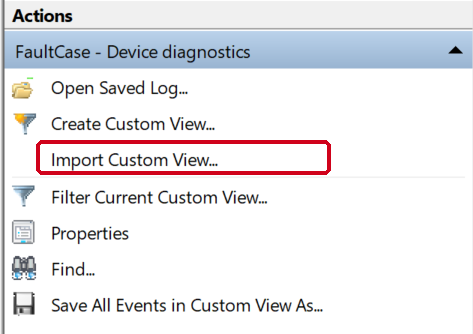
Actions panel, on the right side of Event Viewer. - Click the new view under Custom Views and wait until the number of events appears.

- In the Actions panel, click Save All Events in Custom View As… and save the .evtx file.
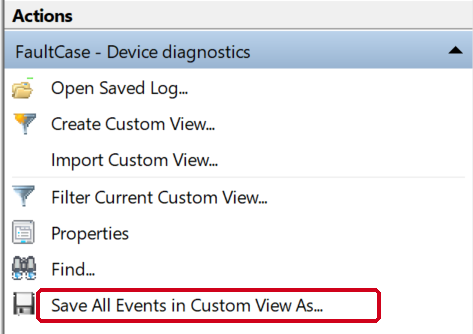
Actions panel, on the right side of Event Viewer. - Come back here and upload that file below.
-
Upload the .evtx
Your file is processed in memory and deleted right after. Max 20 MB.
⚠️ Don't close or refresh this tab: Muse is analyzing your information to give you an answer.
What happens now
- Reading the events in your file
- Counting incidents with fixed rules (no AI)
- Two independent analyses with Muse Spark Open
- Writing your warranty case
-
Or skip all that
Explore a real anonymized case: 6 reboots on a new laptop.
⚠️ Don't close or refresh this tab: Muse is analyzing your information to give you an answer.
What happens now
- Reading the events in your file
- Counting incidents with fixed rules (no AI)
- Two independent analyses with Muse Spark Open
- Writing your warranty case